


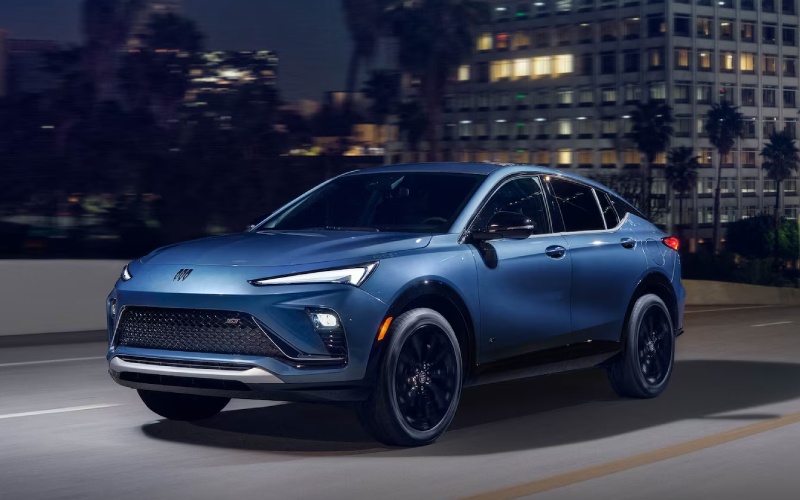
Leesburg Buick - Is the 2026 Buick Envista’s 11-inch Display Easy to Use with Apple CarPlay® near Sterling, VA?
Everyday tech convenience matters when you spend time along Route 7, Route 28, or the Dulles Greenway. If you are considering a sleek, city-smart SUV that keeps your maps, music, and messages close at hand, the 2026 Buick Envista stands out with its Ultrawide 11" diagonal infotainment display and wireless Apple CarPlay® and wireless Android Auto™ compatibility. At Leesburg Buick GMC, we see how much this matters to Sterling drivers who want quick, reliable connectivity without a tangle of cords.
Below, we break down what the Envista’s big display does especially well, how wireless integration works in daily life around Sterling, which trims and packages to consider, and a simple setup guide. Our goal is to help you decide with confidence whether the 2026 Envista’s infotainment experience is the right fit for your commute, school runs, and weekend plans across Loudoun County and beyond.
Why the Envista’s 11-inch display feels right for Sterling, VA driving
The 2026 Envista makes screen real estate a priority. The Ultrawide 11" diagonal HD color touchscreen is standard on every trim, so you do not have to step up to enjoy a bigger, clearer interface. Pair that with a reconfigurable 8" diagonal Driver Information Center, and key info stays where you want it — navigation guidance, audio, and driver data are easy to glance at without hunting through menus.
Wireless Apple CarPlay® and wireless Android Auto™ compatibility are also standard. That means you can leave your phone in your bag or pocket and still launch your favorite apps on the center display. Sterling drivers tell us they appreciate this when hopping between quick stops near Dulles Town Center, pulling into a gym or grocery run in Cascades, or meeting friends at One Loudoun — the system is designed to reconnect automatically after your first pairing so it is ready when you are.
What this looks like in real life around Sterling
Imagine backing out of your townhome space, the screen wakes, and your phone connects wirelessly before you exit the neighborhood. A few taps and you have Apple Maps or Google Maps routing around backups on Route 28, or guiding you to a new lunch spot in Herndon. Voice commands through Siri or Google Assistant help you keep hands on the wheel and eyes up, which is especially useful when traffic compresses near the Route 7 and Claiborne Parkway interchange.
QuietTuning® with Active Noise Cancellation helps here, too. By reducing certain road and wind sounds in the cabin, the Envista creates a calmer environment for hearing prompts and using voice control clearly. Whether you are merging onto the Dulles Toll Road or cruising east toward Tysons, the combination of a big, bright screen and a quiet cabin makes guidance easier to follow and entertainment more enjoyable.
The essentials — standard features across trims
Every 2026 Envista — Preferred, Sport Touring, and Avenir — includes the Ultrawide 11" diagonal HD color touchscreen plus wireless Apple CarPlay® compatibility and wireless Android Auto™ compatibility. That means you can shop by design and comfort without compromising the infotainment experience you want.
Beyond the screen, each Envista also includes Buick Driver Confidence, a suite of safety and driver assistance features designed to support your daily drive. Standard content includes Automatic Emergency Braking, Front Pedestrian Braking, Forward Collision Alert, Following Distance Indicator, Lane Keep Assist with Lane Departure Warning, and IntelliBeam Auto High Beams. For Sterling-area commutes — think dusk drives on Route 7, or navigating busy parking lots — these technologies add helpful confidence.
Helpful upgrades to consider for a cleaner, cord-free cabin
If you want a truly wire-free routine, consider available wireless smartphone charging. It is standard on Avenir and available via the Convenience II Package on Preferred and Sport Touring. When your phone can connect wirelessly and charge wirelessly, you eliminate the cable shuffle that tends to clutter the console. That is a small upgrade with a big day-to-day benefit for those rotating between remote workdays, after-school pickups, and weekend trips out to Great Falls Park.
You can also add the Advanced Safety Package on certain trims, which includes features like Adaptive Cruise Control, Rear Cross Traffic Alert, and Lane Change Alert with Side Blind Zone Alert. While these are not infotainment features, many shoppers pair them with the big screen because audible and visual alerts integrate naturally into your driving flow.
Quick-start guide — pairing your phone wirelessly
Most drivers complete setup in a few minutes. Once paired, compatible phones typically reconnect automatically when you start the vehicle. Here is a simple walk-through you can try during a test drive at our store.
- Start the Envista and confirm the Ultrawide 11" diagonal infotainment display is on
- Enable Bluetooth and Wi-Fi on your smartphone
- Open the phone’s Bluetooth menu and select the vehicle name when it appears
- Confirm the pairing code shown on the phone and on the vehicle display
- Accept prompts to use Apple CarPlay® or Android Auto™ on the vehicle screen
- Enable notifications and contact access if you want calls and messages to display
Once you complete these steps, your home-screen apps — maps, music, podcasts, and messaging — appear on the Envista’s display in a familiar layout. From there you can tap or use voice commands to get moving.
Tips to get the most from the Envista’s display on local roads
A few small habits can make this great interface feel even better in daily use:
- Customize your home screen so your top three apps are up front
- Use voice control for addresses on the move to reduce tapping
- Set your favorite routes for Sterling to Tysons or Leesburg to Dulles ahead of time
- Try night mode before an evening pickup at Dulles International Airport for gentler glare
- Keep your phone’s software updated for smoother wireless connections
Because the 8" diagonal Driver Information Center is reconfigurable, you can also experiment with what shows in front of you versus on the big center screen. That way, the information you value most is always easiest to see.
How it compares to your current vehicle’s screen
If you are upgrading from an older SUV or sedan, the Envista’s standard 11-inch display will likely feel significantly larger and more responsive. Wireless Apple CarPlay® and wireless Android Auto™ compatibility eliminate the repetitive plug-in step many drivers are used to, while the UI design keeps tap targets sizeable — helpful when you are glancing away from the traffic flowing past Dulles Town Center or easing through the Sterling Park area.
Combine that with the Envista’s quiet ride and supportive seating, and the result is a cabin that feels thoughtfully aligned to the way most of us actually drive, navigate, and stay connected day to day.
Test-drive checklist for infotainment — try this at Leesburg Buick GMC
We encourage you to pair your phone during your visit and try your own routine. Bring your favorite music app, set a route to your neighborhood, and test voice commands with the cabin at a stop and at speed. If you want to compare trims, our team can also show you how the available wireless smartphone charging pad helps keep things truly cable-free.
Our store is a short drive from Sterling, and our team can help you explore the Envista lineup — Preferred, Sport Touring, and Avenir — so you can see how the infotainment experience aligns with other comforts like a heated flat-bottom wrapped steering wheel, available moonroof, and the convenience of an available power liftgate.
Frequently Asked Questions:
Is the Ultrawide 11" diagonal HD color touchscreen standard on every 2026 Buick Envista?
Yes. Preferred, Sport Touring, and Avenir all include the Ultrawide 11" diagonal HD color touchscreen along with wireless Apple CarPlay® compatibility and wireless Android Auto™ compatibility.
Do I need a cable to use Apple CarPlay® or Android Auto™ in the Envista?
No. The 2026 Envista supports wireless Apple CarPlay® and wireless Android Auto™ compatibility, so you can connect and run your apps without plugging in.
Does the 2026 Envista offer wireless smartphone charging?
Yes. Wireless smartphone charging is standard on Avenir and available on Preferred and Sport Touring through the Convenience II Package. Our team can demonstrate it during your test drive.
Will the system reconnect automatically every time I get in the vehicle?
After your initial pairing, compatible phones typically reconnect automatically when you start the Envista. If you ever switch primary devices, you can easily select a different paired phone from the display.
How does QuietTuning® with Active Noise Cancellation help with voice commands?
QuietTuning® with Active Noise Cancellation helps reduce certain road and wind sounds in the cabin, making it easier to hear prompts and for the system to understand your voice when using Siri or Google Assistant.
Ready to try the 2026 Buick Envista’s infotainment for yourself on the roads you know best? Visit us at Leesburg Buick GMC — just minutes from Sterling — and pair your phone, run your favorite apps, and see how the Ultrawide 11" diagonal display, Buick Driver Confidence, and available wireless smartphone charging fit your everyday routine. We are here to help you find the right trim and features for a connected, comfortable drive across Loudoun County.